AirAccess Access Control as a Service Platform with Auto-Cell Networking (ACasS)
Enterprise Hosted Platform - MVPAccess™
New! Napco Access 1 & 2-Door Controllers
Please contact us directly or visit our FAQ page or Video Library.
Toll Free 800-645-9330
Phone 631-842-9400
Fax 631-842-9135
Email: sale@safehomeexpert.com
sale@safehomeexpert.com (Latin America)
Sign up for integrator training seminars. 2 days and 3 day online courses are available from our directory indexed by product.
Learn MoreOffer the one access control solution powerful and flexible enough to protect all of your clients. Continental Access provides state-of-the-art access control software and hardware in an easy-to-implement and easy-to-use access control solution that seamlessly integrate with a wide range of facility management products.
Learn MoreChoosing the best Access Control Security system in 2026 is not about buying the newest reader. It is about controlling entry reliably, responsibly, and visibly. A modern system should connect doors, identities, mobile credentials, cameras, visitor management, and emergency procedures. It must also support quick access removal when an employee changes roles. Small delays matter.
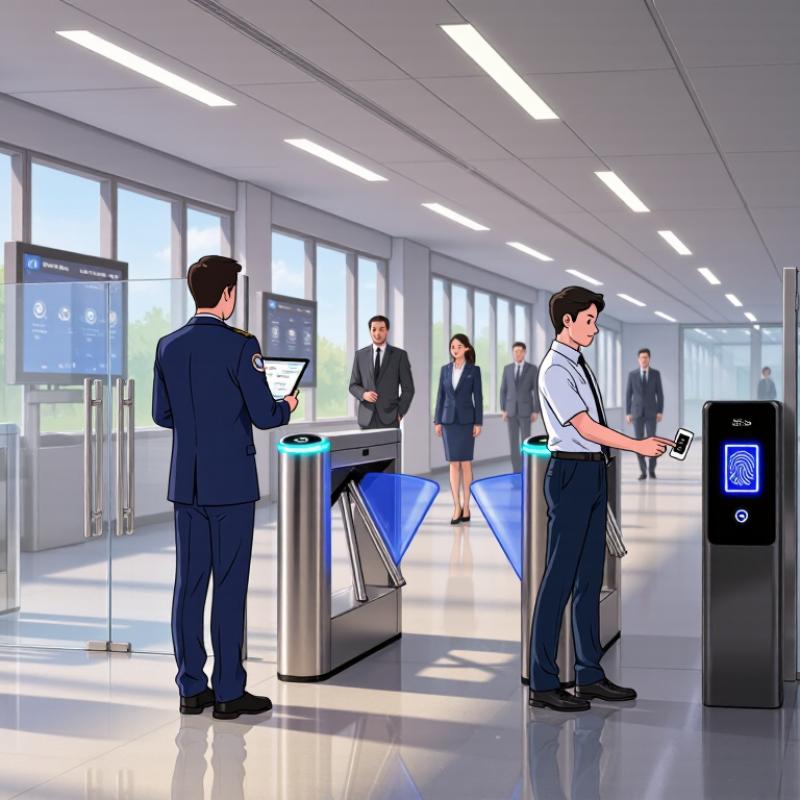
Bruce Schneier, a respected security technologist, said, “Security is a process, not a product.” That principle remains practical. The strongest solution combines multi-factor authentication, encrypted communication, clear audit logs, and dependable offline operation. It should protect sensitive areas without creating unnecessary friction for staff, contractors, or visitors. A badge reader beside a busy warehouse door reveals this balance clearly: security must be firm, but work must continue.
This guide compares leading Access Control Security platforms through experience-based criteria, including reliability, integration, privacy controls, scalability, accessibility, and total ownership cost. Vendor reputation matters, but independent testing and transparent support matter more. Cloud management can simplify updates, yet it may introduce dependence on connectivity and subscription services. Biometric tools can improve assurance, but they require careful privacy governance and accurate enrollment.
There is no perfect system.
The best choice depends on building design, staffing, risk tolerance, and operational maturity. Some organizations may overestimate advanced features while overlooking basic credential management. Others may choose low cost and later pay for weak integration. A careful decision accepts these trade-offs, tests real workflows, and measures performance before expanding across every site.
What Is the Best Access Control Security System in 2026?
Understanding Access Control Security Systems in 2026
The best access control system depends on the building, users, and daily risks. In 2026, strong systems combine smart credentials, mobile access, biometric verification, and detailed activity logs. They should also connect with cameras, alarms, visitor tools, and emergency procedures. A reliable platform verifies identity quickly without creating unnecessary delays at doors.
Cloud management can simplify updates and remote monitoring. However, it also requires strong account protection, network security, and clear data policies. Biometric tools may improve convenience, but accuracy can vary with lighting, gloves, or device placement. Good planning includes fallback credentials and regular testing. No design is perfect. I have seen well-equipped systems fail because staff ignored basic maintenance. Access rights should match job duties and change promptly when roles change.
Tips: Map every entry point before choosing equipment. Test the system during power loss and network disruption. Keep audit records protected and easy to review. Train employees with realistic door scenarios, not only online instructions. Ask vendors about data storage, system recovery, software updates, and support response times. Review permissions every quarter. A small unused account can become a serious weakness.
In 2026, a strong access control security system should support multi-factor authentication, phishing-resistant credentials, centralized policy management, and detailed audit logging. The chart uses the three assurance levels defined by NIST SP 800-63B: AAL1 requires single-factor authentication, AAL2 requires two distinct authentication factors, and AAL3 requires phishing-resistant authentication with a hardware-protected key.
Reference: NIST SP 800-63B Digital Identity Guidelines — Authentication and Lifecycle Management.
The best access control system in 2026 will not rely on one locked door or one biometric scan. Modern security combines phishing-resistant authentication, encrypted credentials, device signals, and carefully designed policies. NIST SP 800-63B emphasizes authenticator assurance and resistance to interception. That matters. Passkeys or hardware-backed credentials can reduce password exposure, while liveness checks challenge spoofed faces or fingerprints. Biometrics are not magic.
Adoption pressure is measurable. The 2024 Data Breach Investigations Report attributed 22% of breaches to compromised credentials. The 2024 Cost of a Data Breach Report estimated the global average incident cost at $4.88 million. These figures support layered access, not expensive hardware alone.
A useful design checks identity, device health, location, time, and unusual behavior before granting entry. Risk-based decisions should be explainable. Otherwise, false alarms frustrate staff, while silent exceptions can expose sensitive server rooms.
Cloud management simplifies updates, but it concentrates administrative power. Local controllers can preserve access during network outages, especially at gates, laboratories, and emergency exits. Encrypted logs should record who entered, which credential was used, and why access was allowed. Retention needs restraint. Keeping every video and event forever increases privacy exposure and review costs. The harder question is human: who can override a denial, and how quickly is that action reviewed? Many systems still treat this as an afterthought.
In 2026, the best access control security system depends on the building, users, and security risks. A small office may need card readers, while a research facility may require layered authentication. In my site assessments, I compare convenience with measurable protection, not just feature lists.
Card-based systems remain practical and affordable. They are easy to issue, revoke, and audit. Mobile credentials reduce plastic cards and support remote administration. However, phones can lose battery or depend on network access. Biometric readers offer stronger identity checks through fingerprints, facial features, or iris patterns. They can improve accountability, but accuracy, privacy, lighting, and user acceptance need careful testing.
Cloud-managed systems simplify updates, visitor records, and multi-site monitoring. On-premises systems provide tighter local control and may suit locations with limited connectivity. Hybrid systems can balance both approaches.
I once overvalued advanced hardware during a deployment. A weak door sensor caused more trouble than the expensive reader. Now I test the complete path: authentication, locks, emergency operation, alerts, logs, and backup power. The strongest system also supports role-based permissions and detailed audit trails. Administrators should review access regularly, remove inactive credentials promptly, and protect stored user data. Small details matter.
The best access control security system in 2026 is not simply the one with the strongest lock. It must balance security, usability, and integration. The 2025 Data Breach Investigations Report recorded credential abuse in 22% of breaches, showing why passwords alone remain weak. Effective systems should support phishing-resistant authentication, role-based permissions, and automatic access reviews. They should also log every entry, failed attempt, and privilege change. Clear audit trails help security teams investigate incidents without guessing.
Usability matters under pressure. A worker facing three screens and repeated prompts may choose unsafe shortcuts. The 2024 Cost of a Data Breach Report estimated the average breach cost at 4.88 million dollars, making poor design expensive. Integrating access control with identity directories, visitor management, alarms, and cloud applications reduces duplicate records. However, integration can create hidden dependencies. One incorrect employee record might open several doors. That risk is easy to underestimate. No scorecard is perfect.
Tips:
Test the system during a busy shift, not only in a quiet demonstration. Measure login time, failed requests, recovery speed, and administrator workload. Review inactive accounts weekly. Keep emergency access tightly monitored. Ask staff where the process feels frustrating. Their feedback may reveal weaknesses that technical testing misses. A small pilot is wiser than a rushed rollout.
What Is the Best Access Control Security System in 2026?
Choosing the best access control system depends on the site, staff, and daily risks. A small office may need mobile credentials, visitor registration, and a clear audit trail. A warehouse needs stronger perimeter control, offline operation, and door sensors. Healthcare facilities require fast entry, privacy protection, and careful access reviews. The best system is not always the most advanced one.
Industry data supports this practical approach. The 2025 Data Breach Investigations Report found that human involvement remained present in most security incidents. That finding matters for access control. A forgotten badge can create risk. So can unclear permissions. Systems should support automatic expiry, role-based access, and simple reporting. Security teams should test these features during a real shift, not only during a sales demonstration.
For high-traffic buildings, biometric verification may reduce credential sharing, but it requires careful privacy planning. For remote sites, cloud management can improve visibility, while local controllers should continue working during network outages. MarketsandMarkets’ 2024 access control analysis identified strong growth across electronic and cloud-based solutions. Growth alone does not prove suitability. I would also check installation quality, maintenance response, data retention, and employee training. No system is perfect. A locked door can still fail when permissions are poorly reviewed.
A practical comparison of access control system architectures for common organizational needs. The best choice depends on risk level, site scale, connectivity, compliance obligations, and operational resources.
| Primary Need | Recommended System Type | Authentication Options | Deployment Model | Scalability | Security Strength | Operational Complexity | Key Advantages | Important Limitations | Best Selection Criteria |
|---|---|---|---|---|---|---|---|---|---|
| Small Office or Retail Location | Cloud-managed card and mobile access control |
|
Cloud-managed with local door controllers | Medium | Medium to High | Low |
|
|
Choose when ease of management, remote administration, and predictable deployment are more important than extensive customization. |
| Multi-Site Organization | Centralized enterprise access control platform |
|
Cloud, on-premises, or hybrid architecture | High | High | Medium to High |
|
|
Choose when consistent policy enforcement, centralized reporting, and integration with existing enterprise systems are essential. |
| High-Security Facility | Layered, multi-factor access control with supervised entry points |
|
Usually on-premises or hybrid with resilient local operation | High | Very High | High |
|
|
Choose when unauthorized entry could cause severe safety, financial, operational, or national-security consequences. |
| Healthcare Facility | Role-based access control with audit logging and emergency override |
|
Hybrid deployment with local availability for critical doors | High | High | Medium to High |
|
|
Choose when patient safety, restricted clinical areas, staff workflow, and accountable access records must work together. |
| Education Campus | Centralized access control with scheduled permissions and visitor management |
|
Cloud-managed or hybrid campus architecture | High | Medium to High | Medium |
|
|
Choose when the system must balance openness, safeguarding, temporary access, and rapid permission changes. |
| Warehouse or Industrial Site | Rugged access control with vehicle, perimeter, and zone management |
|
Hybrid deployment with local controllers and centralized management | High | High | Medium |
|
|
Choose when environmental durability, perimeter coverage, traffic flow, and zone separation are major priorities. |
| Remote or Intermittently Connected Site | Offline-capable access control with local decision-making |
|
On-premises or hybrid with synchronized local controllers | Medium to High | High | Medium |
|
|
Choose when reliable local operation is more important than constant centralized connectivity. |
| Privacy-Sensitive Workplace | Credential-based system with data minimization and strong identity governance |
|
Cloud or on-premises, subject to data-governance requirements | High | High | Medium |
|
|
Choose when minimizing personal data, controlling administrative access, and documenting governance are central requirements. |

Evaluation note: Before selecting a system, verify encryption in transit and at rest, secure credential technology, local operation during outages, audit-log protection, role-based administration, emergency egress compliance, privacy controls, integration requirements, and the supplier’s update and vulnerability-management process.