What Is a Door Access Control System?

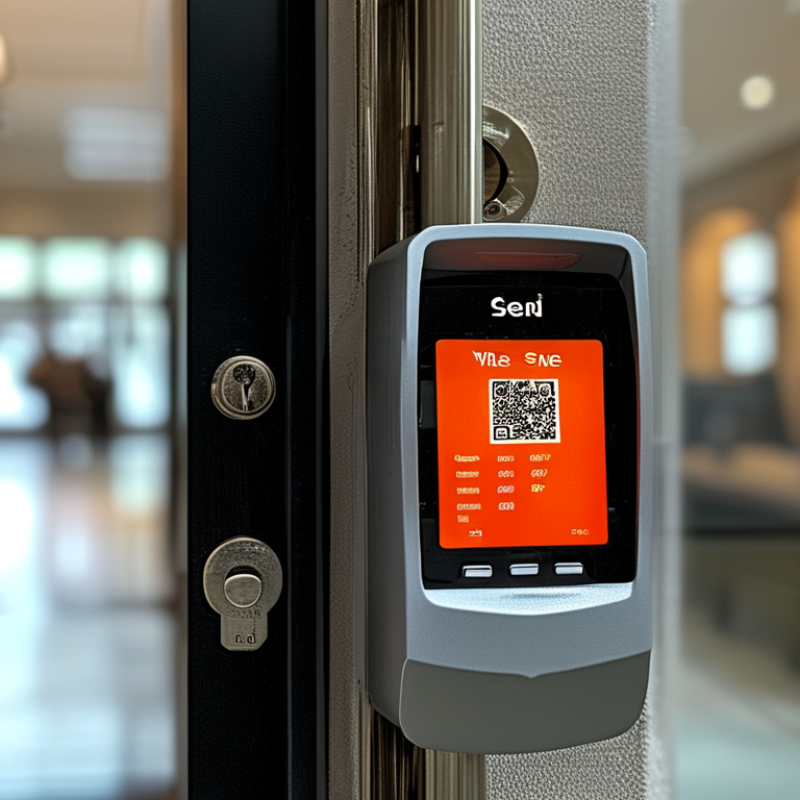
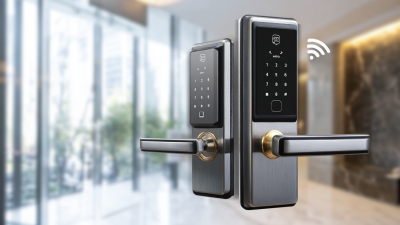
A Door Access Control System regulates who may enter a building, when access is allowed, and which areas remain restricted. Unlike a traditional key, it can combine credentials, time schedules, audit trails, and live alerts. A card reader beside a glass entrance, a lock controller inside the ceiling, and software on a security manager’s screen form one connected system.

Market research shows why this technology matters. Grand View Research estimates that the global physical access control systems market reached approximately USD 8 billion in 2023, with continued growth expected through 2030. MarketsandMarkets also forecasts strong expansion, driven by cloud management, mobile credentials, and demand for better workplace security. The figures vary between reports. That difference deserves attention. Market definitions and regional coverage are not always identical.

Security technologist Bruce Schneier states, “Security is a process, not a product.” His observation applies directly to Door Access Control Systems. A reliable installation requires more than selecting a smart lock. It needs careful credential management, tested emergency procedures, software updates, visitor policies, and regular review of access logs. Experience shows that small weaknesses matter. An unused administrator account, a poorly positioned reader, or an expired employee credential can undermine an expensive system. Good design therefore balances protection, convenience, privacy, and business continuity. This guide explains how these systems work, what components they include, and which questions buyers should ask before installation.

What Is a Door Access Control System?

What Is a Door Access Control System? Definition and Core Functions

What Is a Door Access Control System? Definition and Core Functions

A door access control system manages who can enter a building, room, or restricted area. It replaces or supports traditional keys with credentials such as cards, PINs, mobile devices, or biometric data.

When someone presents a credential, the reader sends its information to a controller. The controller checks permission rules and unlocks the door when access is approved. Otherwise, the lock remains secured.

The system also records entry events, including the user, time, and door location. This audit trail helps facility teams investigate incidents and review daily movement.

Core functions often include user enrollment, access scheduling, remote door control, alarm notifications, and automatic lock management. For example, an office might permit staff entry from 8 a.m. to 7 p.m., while limiting server-room access to trained personnel.

Reliable systems should also support emergency procedures and continue operating safely during network or power problems. Real-world installation is rarely perfect. Poorly positioned readers, weak network coverage, or forgotten credentials can reduce effectiveness.

Tips: Define access groups before enrolling users. Keep permissions narrow and review them regularly. Test the system during normal hours and emergencies. Protect administrative accounts with strong, unique passwords. Do not rely on logs alone; compare unusual events with staff schedules and camera evidence. A simple door may need more planning than expected.

How Door Access Control Systems Verify Users in Three Steps

What Is a Door Access Control System?

How Door Access Control Systems Verify Users in Three Steps

A door access control system checks identity before releasing a lock. It normally verifies users in three steps. Step one is identification. The user presents a card, mobile credential, PIN, or biometric trait. Step two is authentication. The reader compares that claim with approved records. Stronger systems may request two independent factors. NIST SP 800-63B treats authentication strength as an assurance decision, not a simple pass-or-fail feature.

Step three is authorization. The controller checks the user’s role, location, schedule, and current door status. It then permits or denies entry and records the event. This audit trail helps security teams investigate unusual access, such as a badge used at 2 a.m. Verizon’s 2024 Data Breach Investigations Report found that the human element appeared in 68% of breaches. Shared credentials, rushed enrollment, and lost cards remain practical weaknesses. Technology does not remove poor procedures. It only exposes them faster.

Tips: Start with clear enrollment rules. Issue one credential per person. Review inactive users weekly. Test emergency release functions during scheduled drills. Keep logs protected and readable. A small failure matters. For example, a door may authenticate a valid badge while ignoring an open-door alarm. Teams should review these exceptions, document corrections, and question whether convenience has quietly weakened security.

What Is a Door Access Control System?

A door access control system typically verifies users in three sequential steps: presenting a credential, validating the credential, and checking whether access is authorized for the requested door and time.

Key Components: Readers, Controllers, Locks, Sensors, and Software

What Is a Door Access Control System?

Key Components: Readers, Controllers, Locks, Sensors, and Software

A door access control system manages who may enter a protected space. It verifies a credential, records the event, and releases the door when conditions are met. In a small office, an employee may present a card near the reader before entering. The reader captures the credential and sends its data to the controller. Accuracy matters here.

The reader identifies the user or credential. The controller makes the access decision. It communicates with the electric lock and follows configured permissions. Locks secure the door physically, while door position sensors report whether it is open or closed. Request-to-exit sensors help prevent false alarms when someone leaves normally. Each component must match the door, wiring, and daily traffic.

Software connects these parts through user profiles, schedules, event logs, and alerts. An administrator can review unusual openings or remove access after a role changes. Good systems also support backups, clear permissions, and careful maintenance. I have seen installations fail because a sensor was placed poorly, not because the software was weak. The lesson is simple: test the complete doorway. A polished interface cannot fix a misaligned lock.

Some assumptions deserve review. A reader alone does not create security. People still prop doors open, share credentials, or ignore alerts. Regular checks, staff training, and documented procedures make the technology more reliable. Availability matters too. If power or network service fails, the chosen fail-safe behavior should fit the building’s safety needs.

Credential Technologies: 125 kHz, 13.56 MHz, PINs, and Biometrics

What Is a Door Access Control System?

A door access control system decides who may enter a protected space. It checks a credential, records the event, and releases the lock when access is approved. In real installations, the credential reader, controller, lock, and management software must work together. A reliable system also keeps access available during planned power or network interruptions.

Credential choice matters. Older 125 kHz cards are simple and widely understood, but they may offer limited security features. Many 13.56 MHz credentials support stronger data protection and can carry more information. However, frequency alone does not prove security. A poorly configured reader can weaken a modern credential. PINs are convenient, especially for small offices, but shared codes reduce accountability. Biometrics, such as fingerprints or facial patterns, can improve convenience. Yet wet fingers, poor lighting, privacy concerns, and false rejections need careful planning. No credential is perfect.

Tips: Test readers near metal doors and crowded entrances. Use unique PINs, short access schedules, and prompt revocation after staff changes. Keep a backup method for failed fingerprints or forgotten cards. Review audit logs regularly, but avoid collecting unnecessary personal data. During a site check, observe real users, not only ideal conditions. A door may open smoothly in a demonstration and still frustrate people at 8:30 a.m. That gap deserves attention.

Industry Standards: 26-Bit Wiegand, OSDP, and 115.2 kbps Links

A door access control system decides who may enter, when, and through which door. A reader checks a credential, then sends data to a controller. The controller compares that data with permissions and activates the lock when conditions match. Wiring still matters.

The 26-bit Wiegand format remains common in older installations. It usually sends a fixed credential number through separate data lines. This interface is simple, but communication is mostly one-way. The controller may not know whether the reader is disconnected or tampered with. It also offers limited diagnostics and little flexibility for modern security requirements.

OSDP uses a two-wire RS-485 connection and supports communication in both directions. Installers can monitor reader status, configure devices, and use stronger protected communication when properly enabled. The link can operate at 9.6, 19.2, 38.4, 57.6, or 115.2 kbps, depending on the equipment and site design. Higher speed can reduce response delays, but it does not repair poor cable routing or excessive distance. Keep power and signal wiring stable. Avoid sharing noisy paths with motors or heavy electrical loads. In field commissioning, I would test every reader under normal and peak activity. A system that works on a bench may behave differently beside a lift motor. That detail is easy to underestimate. Some specifications also describe 115.2 kbps as a feature, although the complete installation may not support it. Check the controller, reader, cable, and configuration together.

What Is a Door Access Control System? – Industry Standards: 26-Bit Wiegand, OSDP, and 115.2 kbps Links

Technical Dimension 26-Bit Wiegand OSDP 115.2 kbps Serial Link
What It Is A commonly used 26-bit card-data format transmitted over a Wiegand interface. An open access-control communication protocol based on differential RS-485 signaling. A communication speed of 115,200 bits per second; it is a data rate, not a complete access-control protocol.
Communication Direction Typically one-way from the reader to the controller. Bidirectional communication between the controller and peripheral device. Depends on the protocol and wiring mode used; the baud rate alone does not define direction.
Physical Signaling Two data lines, commonly identified as Data 0 and Data 1, plus power and ground conductors. Balanced two-wire RS-485 data pair, normally used with power and ground conductors. May use RS-485, RS-232, or another serial physical layer, depending on the implementation.
Data Structure 26 total bits: 1 leading even-parity bit, 8 facility-code bits, 16 card-number bits, and 1 trailing odd-parity bit. Structured messages with addressing, command types, checksums, replies, and optional secure-channel functions. The payload format, addressing, error detection, and security depend on the protocol layered over the serial connection.
Typical Maximum Cable Length Commonly specified around 150 m (500 ft), subject to cable quality, grounding, interference, and installation guidance. Up to approximately 1,200 m (4,000 ft) under suitable RS-485 conditions and lower data rates; actual distance depends on cable and installation. No universal distance can be assigned from 115.2 kbps alone; higher speeds generally require shorter runs and better signal quality.
Communication Speed Pulse-based signaling; it is not normally described using a configurable serial baud rate. Supports configurable speeds, commonly including 9.6, 19.2, 38.4, 57.6, and 115.2 kbps. 115.2 kbps, equivalent to 115,200 bits per second; actual user payload is lower because of framing and protocol overhead.
Reader Status and Commands Limited; the reader generally sends credential data but does not provide a standardized bidirectional status channel. Supports device addressing, reader status, LED and buzzer control, configuration, and other two-way commands. Available features depend entirely on the application protocol and connected devices.
Security Capability The basic interface does not provide encryption or message authentication. Supports an optional Secure Channel using AES-128 encryption and mutual authentication when properly configured. A baud rate provides no security by itself; encryption and authentication must be supplied by the protocol or devices.
Supervision and Fault Detection Basic implementations have limited supervision and may not reliably identify cable tampering or device failure. Supports supervision features such as device polling, status reporting, and communication fault monitoring. Fault detection depends on the selected serial protocol, termination, shielding, and error-checking method.
Common Use Case Legacy or simple installations where one-way credential transmission is sufficient. New installations requiring longer cable runs, two-way control, diagnostics, supervision, and stronger security. High-speed communication between compatible access-control devices when the selected protocol supports 115.2 kbps.
Primary Limitation One-way communication, limited security, limited diagnostics, and susceptibility to wiring or signal tampering. Requires compatible controllers, readers, cabling, configuration, and correct RS-485 termination practices. High speed can reduce allowable cable length and increase sensitivity to impedance, grounding, noise, and termination issues.
Best Selection Guidance Use when compatibility with existing 26-bit credentials or legacy infrastructure is the main requirement. Prefer for modern, scalable systems that need secure, supervised, and bidirectional reader communications. Select only after confirming that every connected device, protocol, cable run, and network design supports 115.2 kbps.

Note: Cable-distance figures are typical engineering references rather than universal guarantees. Final performance depends on the installed cable, topology, power distribution, grounding, electromagnetic interference, termination, and equipment specifications.

Cart Summary

Subtotal: $0